
How to Build a No-Code Customer Registration and Management Web Application Using Lovable AI
Introduction
Imagine running a business that receives dozens of customer registrations every day. You need to collect customer information, organize records, track interactions, and retrieve details whenever necessary. Managing everything through spreadsheets or paper forms can quickly become overwhelming.
For small businesses and startups, hiring developers to build a dedicated customer management system may also be expensive. Traditional web development requires knowledge of programming languages, databases, server management, and interface design.
Artificial intelligence is changing this process. With AI-powered development platforms, business owners can describe the application they want and allow AI to generate much of the underlying software.
One platform making this possible is Lovable AI. It allows users to build functional web applications using natural language instructions rather than writing code manually. In this guide, we explore how to use Lovable to create a customer registration and management system for a business.
What Is Lovable AI?
Lovable is an AI-powered platform that helps users create websites and web applications by describing their requirements in everyday language.
Instead of manually writing HTML, CSS, JavaScript, and backend code, users can explain what they want to build. Lovable then generates the application interface and supporting functionality.
The platform is particularly useful for entrepreneurs, startups, designers, and business owners who want to turn ideas into working digital products without managing the entire development process themselves.
Lovable can also connect applications to external services for database management, user authentication, and other backend operations. Its integration with Supabase, for example, makes it possible to build applications that store and retrieve customer information.
For a business that needs a customer registration system, this means creating more than just a registration form. You can develop an application with customer records, login functionality, administrative dashboards, and customer management features.
Understanding the Customer Registration and Management System
A customer registration and management system is a web application designed to collect, store, organize, and manage customer information.
Rather than keeping customer details in separate spreadsheets or physical files, businesses can maintain records in one centralized database.
A typical system allows customers to submit their information through an online registration form. Authorized administrators can then access the dashboard to review registrations, search customer records, update information, and manage customer accounts.
For example, a retail business could use the application to register new customers, maintain contact information, and organize its customer database.
A consulting company could use the same system to manage client information and monitor registration records.
The exact functionality depends on the business requirements, but Lovable provides a starting point for creating a customized solution.
Read More: How to Build Interactive Training Courses Faster Using Articulate AI Assistant
How to Build the Application Using Lovable AI
The first step is to visit the Lovable website and create an account. After accessing the platform, you can start a new project and describe the application you want to build.
Instead of giving the AI a vague instruction such as “Build a business website,” provide a detailed description of the intended system.
For example, you can use the following prompt:
Lovable AI Project Prompt
Copy-ready
Build a complete, responsive customer registration and management web application for a business.
The application should include:
- A professional homepage with a customer registration button.
- A registration form that collects full name, email address, phone number, residential address, and registration date.
- A secure login system for administrators.
- An administrative dashboard showing total customers and recent registrations.
- A customer management page with searchable and filterable records.
- Features for viewing, editing, and deleting customer records.
- A customer profile page displaying individual customer information.
- A database that securely stores customer records.
- Form validation and duplicate email detection.
- Responsive layouts for desktop, tablet, and mobile devices.
Use Supabase for database storage and authentication. Apply appropriate security policies so customers cannot access administrative records. Copy project prompt
Lovable will interpret the instructions and generate an initial version of the application. You can inspect the result and request changes through additional prompts.
Designing the Application Dashboard
After generating the initial application, the next step is to improve its appearance and functionality.
A good customer management dashboard should present important information in a way that administrators can understand immediately.
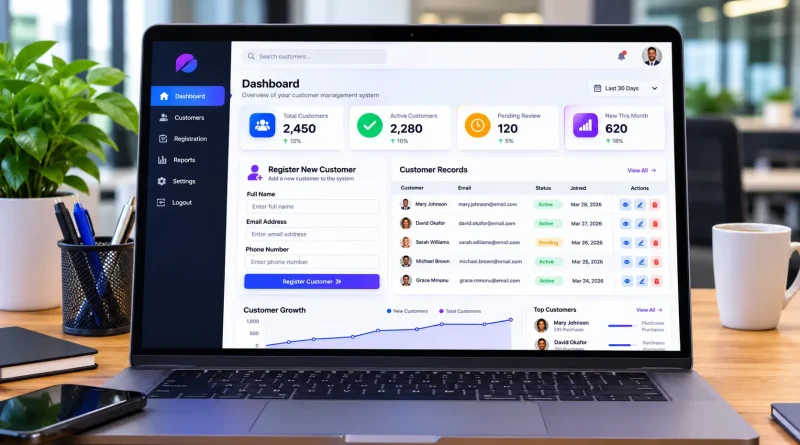
For example, the dashboard can display the total number of registered customers, newly added customers, and recently updated records. It can also include a customer registration chart to help business owners understand registration trends.
The customer management section should provide a searchable table containing customer names, email addresses, phone numbers, and registration dates.
Lovable can generate these elements through additional instructions. You do not need to rebuild the application from scratch whenever you want to introduce a new feature.
You can simply ask the AI to improve the existing project.
For example, enter this prompt:
Dashboard improvement prompt
Improve the administrative dashboard by adding customer statistics, recent registration activity, a customer growth chart, and a searchable customer table. Use a modern professional design with a clean sidebar, responsive navigation, and clear data visualization. Copy prompt
The AI will modify the existing interface based on your instructions. You can continue requesting adjustments until the dashboard matches your business requirements.
Connecting a Database and Setting Up Customer Records
A customer management application needs a reliable database. Without one, information submitted through registration forms may not remain available after a session ends.
This is where Supabase becomes important.
Supabase provides the database and backend services needed to make the application functional. Lovable can connect to Supabase and generate database structures based on natural language instructions. Lovable+1
To establish the connection, open your Lovable project’s integration or cloud settings and select the appropriate backend option. You can use Lovable Cloud or connect your own Supabase project, depending on your requirements.
Once connected, ask Lovable to create a customer database containing fields such as customer ID, full name, email address, phone number, residential address, registration date, and account status.
The platform can generate the necessary database structure and connect the registration form to it.
This allows information submitted by customers to become actual database records rather than temporary information displayed on the screen.
You should also request proper database permissions. Row Level Security (RLS) helps ensure that users can only access information they are authorized to view or modify. Lovable+1
Read More: How to Conduct Faster and Smarter Online Research Using Perplexity AI
Adding Customer Management Features
Once the database is connected, you can expand the application into a more complete customer management system.
One important feature is customer search. Administrators should be able to locate customers using their names, email addresses, or phone numbers. This becomes increasingly useful as the business database grows.
The application should also support customer profile management. When an administrator selects a customer, the system should display the customer’s complete registration information.
Another useful feature is record editing. If a customer changes their phone number or address, authorized administrators should be able to update the information without creating a new registration.
You can also introduce customer categories and account statuses. For example, customers could be classified as active, inactive, or pending verification.
To generate these features, use another instruction:
Customer management prompt
Add a complete customer management module. Administrators should be able to search, filter, view, edit, and delete customer records. Include customer profiles, account status management, registration dates, and confirmation messages before deleting records. Ensure all operations are connected to the database and protected by administrator permissions. Copy prompt
These features transform the project from a basic registration website into a useful business application.
Table: Features of a Customer Management Web Application
| Feature | Business Purpose |
|---|---|
| Customer Registration | Collect customer information |
| Admin Dashboard | Monitor registration activities |
| Customer Database | Store customer records |
| Search and Filtering | Find customer information quickly |
| Customer Profiles | View individual customer details |
| Record Management | Update and manage customer information |
| Authentication | Control access to the application |
Testing and Publishing the Web Application
Before making the application available to customers, it is important to test its functionality.
Start by submitting sample customer registrations and checking whether the information appears correctly in the database.
Test the administrator login to ensure unauthorized visitors cannot access the management dashboard.
You should also test the search function, customer profile pages, record editing, and deletion controls.
Pay attention to the mobile experience. Customers should be able to complete registration forms comfortably using smartphones and tablets.
Security testing is particularly important because the application will contain personal customer information. Verify database permissions, authentication rules, and access restrictions before publishing. Lovable provides security scanning features that can help identify certain configuration problems, although a successful scan does not replace a thorough review. Build Apps Faster+1
Once everything works correctly, use Lovable’s publishing feature to deploy the application and obtain a shareable web address. You can also configure a custom domain for a more professional business presence. Lovable
Benefits of Using Lovable for Business Application Development
Lovable offers several advantages for businesses that want to develop customized software without going through traditional development processes.
The biggest advantage is accessibility. People without programming experience can describe their ideas and use AI to generate application interfaces and backend functionality.
Development speed is another important benefit. Instead of spending weeks building a basic application from scratch, users can generate an initial version and improve it through conversations with AI.
Cost efficiency is also worth considering. Small businesses can experiment with application development without immediately hiring a full development team.
Another advantage is flexibility. Businesses can modify their applications as their needs change. A customer registration system can eventually include appointment management, customer notifications, sales tracking, and reporting.
However, AI-generated applications still require testing, security reviews, and maintenance. Complex business requirements may also require assistance from an experienced developer.
The Future of AI-Powered Business Applications
The development of AI-powered platforms like Lovable signals an important change in software development.
Business owners no longer need to understand every technical aspect of application development before experimenting with digital solutions.
As these platforms improve, building customized business software will become increasingly accessible.
We may see more businesses using AI to develop customer relationship management systems, inventory applications, booking platforms, employee management tools, and financial dashboards.
The combination of natural language development and cloud infrastructure could also make it easier for startups to test business ideas before investing in expensive software development.
Lovable represents part of this growing movement, where the ability to describe a business problem can become the starting point for building a software solution.
Read More: How to Create Engaging AI Social Media Posts Using Canva Magic Write
Frequently Asked Questions
Can I build a customer management system with Lovable without coding?
Yes. Lovable allows you to describe your application requirements using natural language. It can generate the interface, database structures, and application functionality. However, testing and reviewing the generated application remain important.
Does Lovable support customer databases?
Yes. Lovable supports backend integrations such as Supabase and Lovable Cloud, which provide database storage and authentication capabilities. Lovable+1
Can I use Lovable to build applications for my business?
Yes. You can create customized applications for customer registration, inventory management, employee records, appointment scheduling, and other business operations.
Can I publish my Lovable application with a custom domain?
Yes. Lovable supports publishing applications with shareable URLs and custom domain configurations, subject to the applicable platform requirements. Lovable
Conclusion
Building a customer registration and management system no longer requires starting with complicated programming languages or hiring an entire development team.
With Lovable AI, business owners can describe their requirements, generate application interfaces, connect databases, and introduce useful management features through natural language instructions.
By combining Lovable with backend services such as Supabase, it becomes possible to develop applications that collect customer information, manage records, and support everyday business operations.
Although proper testing and security configuration remain essential, these tools significantly reduce the technical barriers associated with software development.
For entrepreneurs, startups, and small businesses, Lovable offers an exciting opportunity to transform business ideas into functional digital applications without traditional coding.