
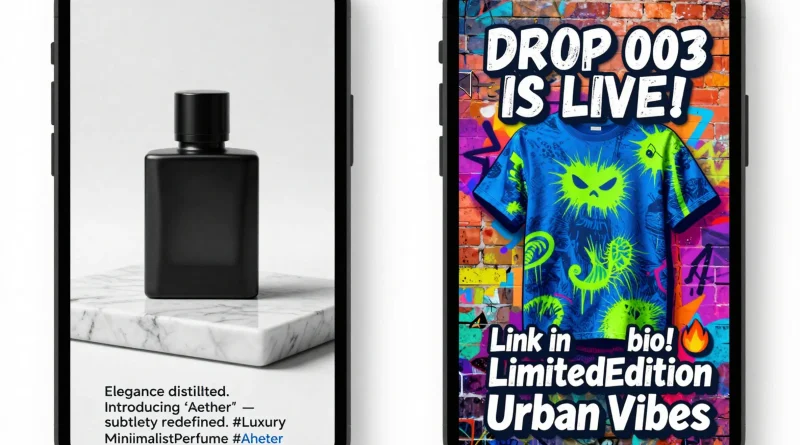
Create Stunning Instagram Marketing Images Using Adobe Firefly AI
Introduction
Social media marketing has evolved at lightning speed. A few years ago, marketers relied on stock photos, basic editing apps, or hiring designers for every post. Producing visually engaging content for platforms like Instagram was time-consuming and expensive.
Today, artificial intelligence has changed the game. Tools like Adobe Firefly allow marketers and creators to generate professional-quality visuals in minutes. Imagine transforming a simple caption or idea into a striking marketing image without needing advanced design skills.
This innovation is helping brands create consistent, eye-catching content that captures attention and drives engagement.
Understanding Adobe Firefly
Adobe Firefly is Adobe’s AI-powered tool for creating digital images. It uses generative AI to transform text prompts, sketches, or concepts into visually appealing graphics.
Unlike traditional design software, Firefly can produce unique images quickly. Users no longer need to manually manipulate every element; the AI handles composition, color, and style.
This makes Firefly ideal for marketers, content creators, and social media managers who need fast, consistent visual content for Instagram campaigns.
Key Features of Adobe Firefly
Adobe Firefly offers several features tailored for marketing professionals:
- Text-to-Image Generation: Type a description, and the AI generates a matching image.
- Style Customization: Adjust artistic style, color palette, and lighting to match your brand.
- Image Editing: Modify elements of an existing image with simple prompts.
- Background Removal: Instantly isolate subjects for flexible composition.
- High-Resolution Output: Generate images suitable for Instagram posts, stories, and ads.
These features reduce design time while maintaining professional quality, making it easier to produce compelling social media content.
Read More: Turn Written Blog Content Into Engaging Podcast Episodes With ElevenLabs AI
Table: Adobe Firefly Features for Instagram Marketing
| Feature | Benefit |
|---|---|
| Text-to-Image | Quickly create unique visuals from descriptions |
| Style Customization | Align images with brand identity |
| Image Editing | Refine visuals without starting from scratch |
| Background Removal | Easily adapt images for various layouts |
| High-Resolution Output | Ensure Instagram posts look professional |

Read More: How to Create a Full YouTube Script in Minutes Using ChatGPT by OpenAI
How to Generate Marketing Images
Generating marketing images with Adobe Firefly is simple. First, start with a clear idea or caption for your Instagram post. The AI works best with specific prompts describing your vision.
Next, select your desired style, such as modern, minimalist, or vibrant. Firefly then generates multiple image variations based on your input.
Review the results and make any refinements using the built-in editing tools. You can adjust composition, colors, or add elements to ensure alignment with your campaign.
Finally, export the images in the appropriate format and size for Instagram. You can now schedule posts, add captions, and track engagement.
Best Practices for Instagram Marketing
Consistency is key for social media branding. Using Firefly, maintain a cohesive color palette and visual style across posts.
Engagement increases when images are tailored to your audience. Analyze which visuals perform best and use AI to generate similar content.
Experimentation is encouraged. Try different styles, prompts, and layouts to see what resonates with your followers.
By combining AI-generated visuals with strong captions and hashtags, marketers can create posts that stand out in crowded feeds.
Read More: How to Build a Professional Sales Presentation Using Microsoft Copilot in Microsoft PowerPoint
Frequently Asked Questions
Can Adobe Firefly generate images for commercial use
Yes, Adobe Firefly images can be used for commercial purposes, but always check licensing terms to ensure compliance with brand guidelines and usage rights.
Is Firefly easy for beginners?
Absolutely. The platform is designed for both beginners and professionals. Clear prompts and intuitive controls make image creation accessible without prior design experience.
Can Firefly integrate with Instagram directly?
Firefly does not post directly to Instagram. However, generated images can be downloaded and uploaded to Instagram using any social media management platform.
What types of marketing images can I create?
You can create product visuals, promotional graphics, story backgrounds, ad creatives, banners, and branded content optimized for Instagram.
Conclusion
Adobe Firefly has transformed how marketers generate Instagram visuals. Leveraging AI, it allows brands to produce professional, engaging content quickly and efficiently.
The tool empowers marketers to maintain consistency, experiment with styles, and capture attention on social media. Brands that adopt AI for visual content can save time, reduce costs, and create more impactful campaigns.


Pingback: Build a Simple Mobile App Without Coding Using Google AppSheet AI - Latest AI/Tech Info
Pingback: How to Create a Professional Startup Logo Using Midjourney AI - Latest AI/Tech Info
Pingback: How to Create a Fully Functional Website Using Wix AI Website Builder - Latest AI/Tech Info